- AI Toast
- Posts
- Computer use is now in Claude Code.
Computer use is now in Claude Code.
Plus: Create a PPT with Claude (Step-by-Step)

Poonam Soni
March 31, 2026

Welcome to AI Toast!
Here’s what’s on the menu today:
Claude Code gets “Computer Use” to automate real workflows
Manus brings AI from cloud to your computer
Superhero Tools for Creating Web Apps
Tutorial: Create a PPT with Claude (Step-by-Step)
Quick Toasts: Microsoft tests Copilot Cowork inside Microsoft 365
Total read time: About 5 minutes, perfect for a quick coffee break.
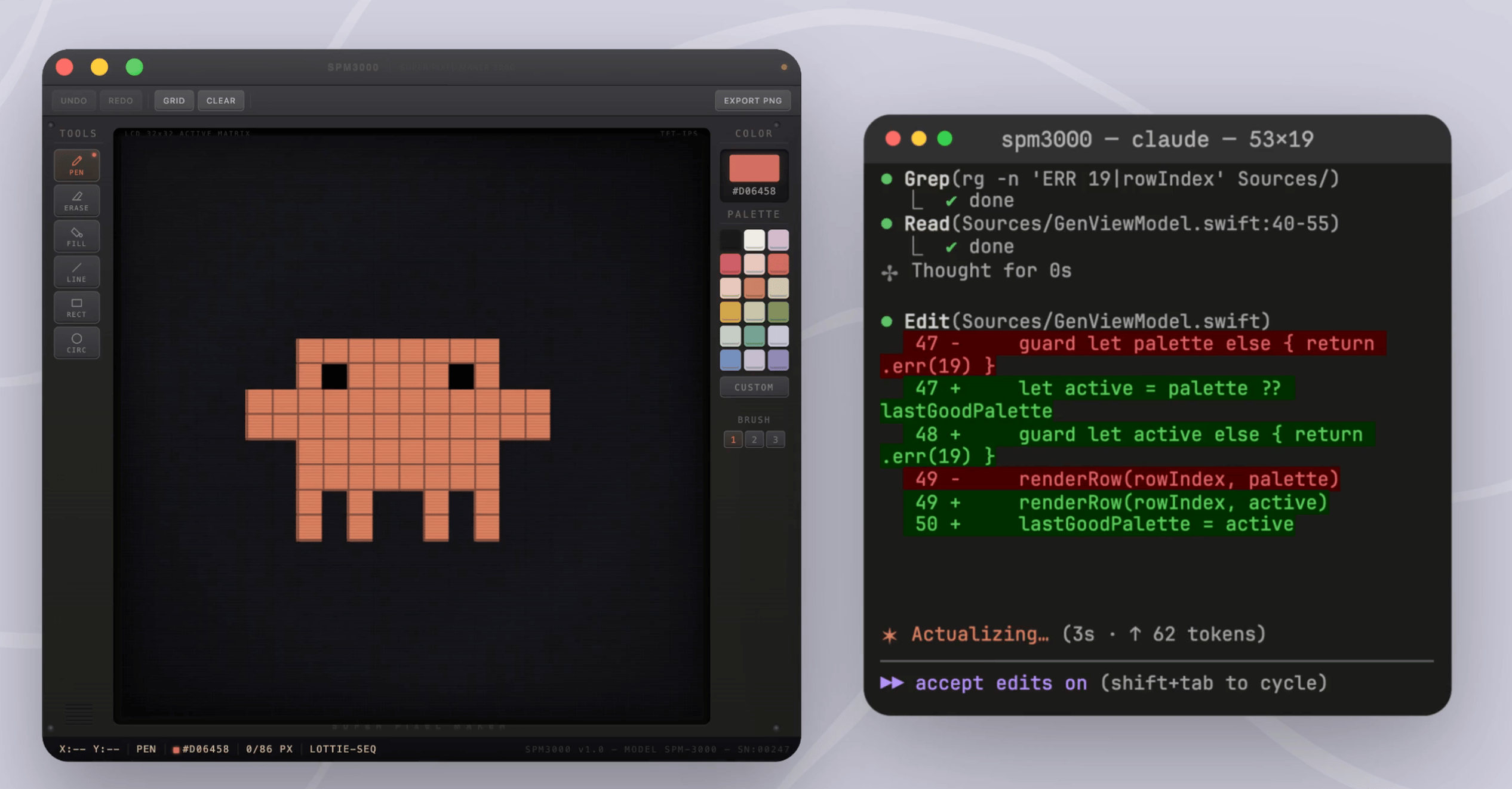
Image Source: Anthropic
Anthropic has introduced computer-use capabilities inside Claude Code, allowing the AI to interact with your computer like a human, directly from the CLI.
The feature is now available in research preview for Pro and Max users on macOS.
Claude can open apps, click, type, and navigate your UI.
Can build code, launch apps, test them, and fix bugs automatically.
Works with GUI-based tools that don’t have APIs or CLI access.
Enables end-to-end UI testing without manual setup.
Can debug visual issues by resizing screens and analyzing layouts.
Supports workflows like running apps, testing flows, and verifying fixes in one prompt.
Requires user approval for app access and permissions.
Currently limited to macOS with Claude Code CLI (research preview).
This moves Claude from just writing code to actually interacting with software environments.
Personal Take: This is a big deal for developers. Testing UI has always been the tedious part, you write the code, then manually click through everything to see if it works. Claude doing that loop automatically is a genuine time-saver. It's also a preview of what AI agents will look like when they stop just giving advice and start actually doing things.

The best marketing ideas come from marketers who live it. That’s what The Marketing Millennials delivers: real insights, fresh takes, and no fluff. Written by Daniel Murray, a marketer who knows what works, this newsletter cuts through the noise so you can stop guessing and start winning. Subscribe and level up your marketing game.

Manus has introduced “My Computer”, a new feature that allows its AI agent to work directly on your local machine instead of just the cloud.
The feature is available via the Manus Desktop app for macOS and Windows.
Lets AI access and manage local files, apps, and folders.
Can automate tasks like organizing files, renaming documents, and sorting data.
Executes commands through the terminal (CLI) to control your system.
Can build apps, run code, and debug workflows directly on your computer.
Allows remote control, you can trigger tasks from your phone.
Uses your computer’s local GPU and resources for AI tasks.
Integrates with tools like Gmail and Google Calendar for full workflows.
Requires user approval before executing commands for safety.
This bridges the gap between cloud AI and local computing, making AI more action-oriented.
Personal Take: This is a big step toward making AI actually useful in daily work. Most of our important files and tools live on our own computers, not the cloud. If AI can safely operate there, it becomes far more powerful than just a chat assistant.
Most coverage tells you what happened. Fintech Takes is the free newsletter that tells you why it matters. Each week, I break down the trends, deals, and regulatory shifts shaping the industry — minus the spin. Clear analysis, smart context, and a little humor so you actually enjoy reading it. Subscribe free.
Superhero Tools (For Creating Web Apps)
Figma Make: An AI-powered design and development tool that lets you turn ideas into interactive web apps using prompts and visual editing, perfect for rapid prototyping.
Replit: A browser-based coding platform with AI assistance that helps you build, debug, and deploy full-stack web apps quickly without complex setup.
Lovable: An AI app builder that converts simple prompts into fully functional web apps, ideal for startups and MVP creation without heavy coding.
Bubble: A no-code platform that allows you to build powerful web applications with drag-and-drop workflows, great for SaaS products and marketplaces.
FlutterFlow: A low-code builder that helps create scalable web and mobile apps with visual UI tools and AI-assisted components.

Go to https://claude.ai and log in to your account.
Start a new chat and clearly describe your presentation topic. Example: “Create a 10-slide presentation on digital marketing trends.”
Ask Claude to generate a slide-by-slide outline first. This helps structure your content before creating the PPT.
Refine the outline if needed (add/remove slides, adjust flow).
Now prompt Claude to expand each slide with content.
Title
Bullet points
Key insights
Ask Claude to format it like:“Write this in PPT format with slide titles and bullet points.”
Copy the final content into PowerPoint / Google Slides.
(Optional) Ask Claude to suggest:
Design ideas
Visuals or icons
Slide themes
Use tools like Canva / PowerPoint Designer to quickly style your slides.
Review and finalize your presentation.
Pro Tip: Ask Claude: “Make this more visual and less text-heavy”, it improves slide quality instantly.
Quick AI News Bites
Fujitsu launches AI tool to modernize legacy systems, using generative AI to analyze old code (like COBOL) and auto-generate design documents, cutting work time by up to 97%.
California introduces new AI safety rules, requiring companies working with the state to implement safeguards against misuse, bias, and harmful outputs.
PixVerse launches V6 AI video model, improving cinematic quality, multi-shot generation, and character realism for creators and businesses.
Apple’s next-gen AI Siri gains attention, with reports suggesting a more powerful, system-wide AI assistant is coming soon.
Boost revenue and gain new customers by partnering with us
Reach over 35K AI enthusiasts with your product.
Join our newsletter to connect with tech professionals, investors, engineers, managers, and business owners worldwide. DM now!
Got feedback, a story worth toasting, or a wild tech question? I’d love to hear from you; just reply, or find me on X.
Cheers,
— Poonam Soni