- AI Toast
- Posts
- US Treasury Ends Use of Claude


In partnership with

Welcome to AI Toast!
Here’s what’s on the menu today:
Treasury ends Anthropic AI use after Trump order
Voice mode is rolling out now in Claude Code
Superhero Tools to save hours
Step by step tutorial on how to create and edit slides with NotebookLM
Quick Toasts: Fast food just got an AI supervisor.
Total read time: About 5 minutes, perfect for a quick coffee break.

Image Source: X
The US Treasury is pivoting away from Anthropic AI, following a direct order from President Trump aimed at tightening national security.
Treasury Secretary Scott Bessent confirmed the termination of all Anthropic products, including the popular Claude platform.
Bessent emphasized that every tool used by the government must serve the public interest and maintain total transparency.
The directive underscores a policy that no private company should dictate the terms or conditions of national security.
Signals a complete phase-out of the startup's technology within the Treasury.
As the federal landscape shifts, the departure from third-party AI platforms could redefine the tech infrastructure of major government institutions.
Personal Take: While AI offers incredible efficiency, the administration is making it clear that national security cannot be outsourced or left to the discretion of private black-box models. It’s a high-stakes bet on sovereign control over digital intelligence.
Want to get the most out of ChatGPT?

ChatGPT is a superpower if you know how to use it correctly.
Discover how HubSpot's guide to AI can elevate both your productivity and creativity to get more things done.
Learn to automate tasks, enhance decision-making, and foster innovation with the power of AI.
Claude Code Gets Voice Mode

Voice mode is now rolling out in Claude Code, bringing hands-free AI interaction to developers. It’s currently live for about 5% of users and will expand gradually over the next few weeks.
Users will see a notification on the welcome screen once they have access.
You can toggle it using the
/voicecommand.It works as push-to-talk, hold space, speak, and release.
The transcript appears directly at your cursor position.
You can mix typing and voice in the same prompt without overwriting text.
Voice transcription tokens do not count toward usage limits.
There is no extra cost to use voice mode.
Available on Pro, Max, Team, and Enterprise plans (rolling access).
This is one of the first major voice integrations built directly into a coding workflow.
Personal Take: This feels surprisingly practical. Coding often involves messy thinking, and being able to just speak through logic or describe what you want could speed things up. If it works smoothly, this might quietly change how developers interact with AI day to day.
Free, private email that puts your privacy first

Proton Mail’s free plan keeps your inbox private and secure—no ads, no data mining. Built by privacy experts, it gives you real protection with no strings attached.
Superhero Tools (Save Hours)
NotebookLM: Google’s AI research assistant that turns your documents into smart summaries, study guides, and even podcast-style conversations perfect for deep work and fast learning.
Lovable: An AI product builder that helps you turn ideas into working apps or websites quickly, even if you’re not a developer.
Taplio: An AI-powered LinkedIn growth tool that helps you write better posts, generate ideas, and build your personal brand faster.
Lyria: Google’s AI music model that lets you generate original music and experiment with creative audio using simple prompts.
Gamma: An AI presentation and content tool that turns rough ideas into clean slides, docs, or webpages in minutes no design skills needed.
How to Create and Edit Slides with NotebookLM
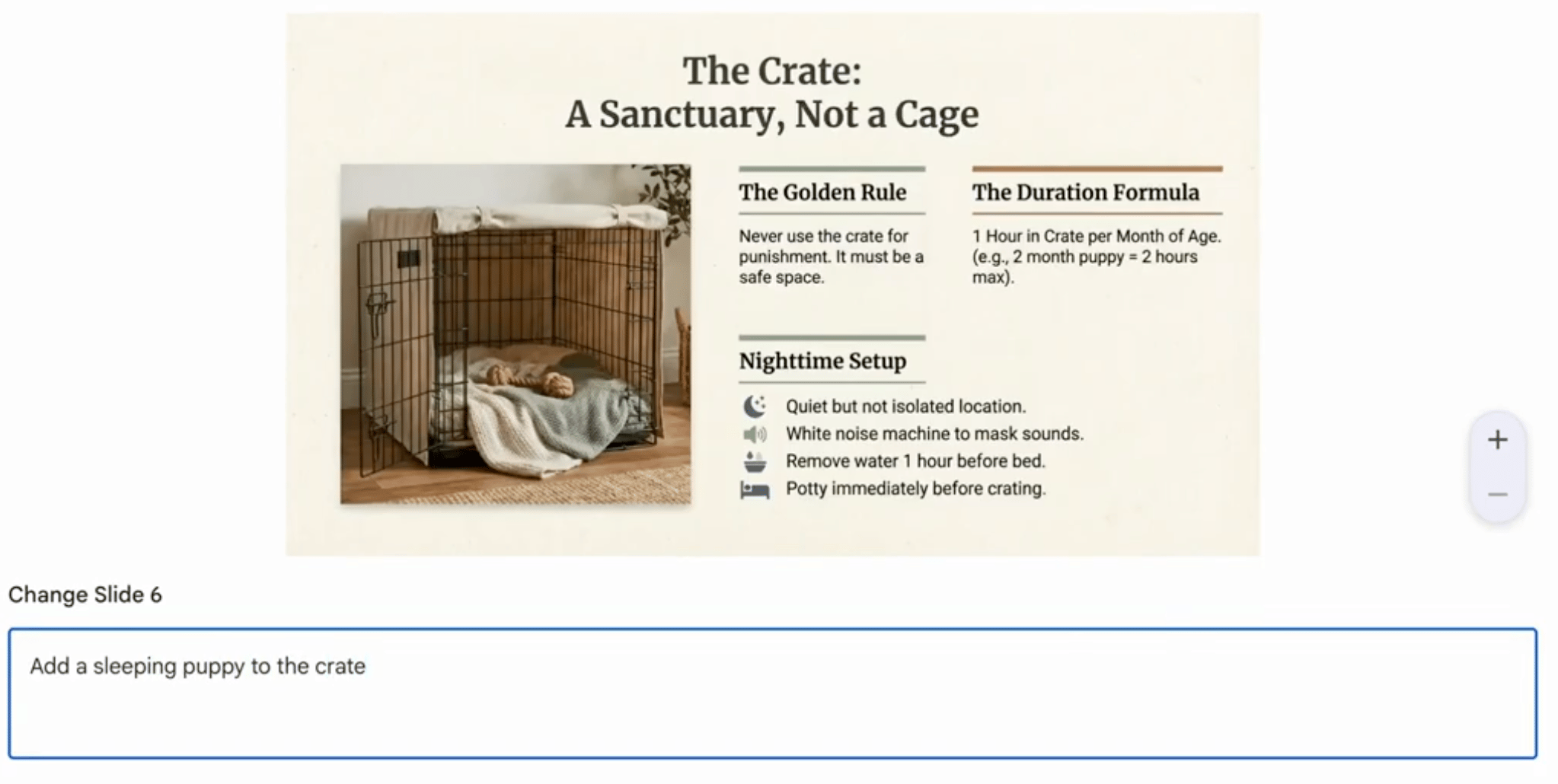
Image Source: Google Blog
Go to https://notebooklm.google.com in your browser. Sign in with your Google account.
Create a new notebook or open an existing one where your research or documents are already uploaded.
Upload your sources if needed — PDFs, Google Docs, links, notes, or pasted text. NotebookLM works best when it has context to pull from.
In the chat panel, type a prompt like:
“Turn this into a presentation outline.” or “Create a 10-slide presentation based on these sources.”
Review the generated slide outline. You’ll typically get structured slide titles with bullet points.
Ask NotebookLM to refine it. For example:
“Make it more visual.”
“Add speaker notes.”
“Simplify for beginners.”
“Turn this into a pitch deck.”
Once you're happy with the structure, ask:
“Format this for Google Slides.” or “Export-ready slide content with headings and bullet points.”
Copy the structured output into Google Slides, Gamma, PowerPoint, or your preferred presentation tool.
If you need edits later, go back to NotebookLM and say:
“Shorten slide 4.”
“Add data to slide 6.”
“Make it more persuasive.”
Iterate. The more specific your feedback, the better the slides become.
That’s it! Most presentations can be drafted in under 10 minutes once your sources are uploaded. NotebookLM is especially powerful because it pulls directly from your own material instead of generating generic content.
Quick AI News Bites
Samsung launches Galaxy S26 with deeper AI features, blending assistants like Gemini and Perplexity into the user experience and introducing proactive AI behaviors on mobile.
Anthropic’s Dario Amodei says society is dangerously underprepared for accelerating AI capabilities, sparking fresh debate on regulation, safety, and long-term readiness.
OpenAI says its agreement with the Department of War includes explicit protections that prohibit domestic surveillance and autonomous weapon use, setting a new precedent for AI deployment in classified government work.
Boost revenue and gain new customers by partnering with us
Reach over 35K AI enthusiasts with your product.
Join our newsletter to connect with tech professionals, investors, engineers, managers, and business owners worldwide. DM now!
Got feedback, a story worth toasting, or a wild tech question? I’d love to hear from you; just reply, or find me on X.
Cheers,
— Poonam Soni